

Powerwizard 1.0, 2.0 Technical Manual – 80 Pages | AutoFix Global
Original price was: $15.61.$10.99Current price is: $10.99.
OEM Powerwizard 1.0 & 2.0 technical manual: 80 pages covering START/STOP/AUTO modes, menu trees, event system, and security protocols.
Description
Powerwizard 1.0, 2.0 Technical Manual
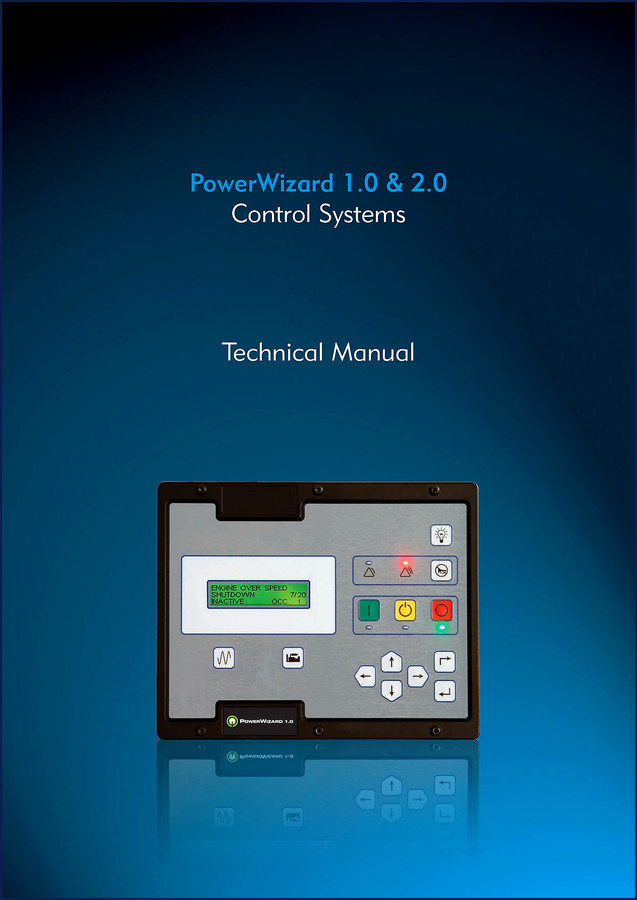
If you are staring at a Powerwizard 1.0 or 2.0 control module with a flashing alarm and no idea what it means, you have landed in the right place. Aftermarket cheat sheets will get you a generic code list, but they skip the real sequence – how the module decides to fault, how to properly cycle the reset, and which menu holds the logged event. I have seen a guy replace an entire controller because he couldn’t clear a crank-fail alarm. This 80-page OEM Powerwizard 1.0, 2.0 Technical Manual is what the factory techs carry. It gives you the exact logic, the menu trees, and the reset procedure that actually works.
Basic Operation: Start, Stop, and Auto Modes
Chapter 2 lays out the three core operating modes exactly as the controller sees them. Section 2.1 covers the START sequence – what happens when the module receives a start signal, including pre-heat delays and crank cycles. Section 2.2 shows STOP mode: immediate stop vs. cooldown stop. Section 2.3 covers AUTO mode, which is where most site generators live. If you have ever had a generator refuse to auto-start after a power outage, the problem is usually in the AUTO mode configuration – the manual walks you through the required input states. Section 2.4 explains the Fault/Alarm Reset Process. That alone has saved me a service call more times than I can count.
User Interface Overview and Menu Navigators
Chapter 3 details the front panel: function keys, menu navigators, and alarm indicators. The manual includes the exact label for each key and what each icon means. Section 3.2 breaks down how to scroll through the menu structure – not a generic diagram, but the actual keystroke sequence to move between screens. Beginners tend to push buttons randomly and lock themselves into a submenu. This manual shows you which key exits and which one saves. It is worth the price of the manual just to avoid that frustration.
Menu Trees: PowerWizard 1.0 vs. 2.0
Section 4.1 (page 12) contains two full menu trees: one for the PW1.0 and one for the PW2.0. The 1.0 has a simpler layout; the 2.0 adds real-time clock programming and extended event logging. The trees are printed as flow diagrams so you can trace a path from the top screen to any parameter. I have used these trees to set engine start delay, crank cycle count, and overspeed thresholds. If you work on both variants, the differences are plain – no guessing whether a parameter exists on the other model. The manual calls them out clearly in section 1.3: PowerWizard Variations (PW1.0 and PW2.0).
Event System: How to Read and Clear Faults
Section 4.2 of this Technical Manual covers the event system in depth. Sub-sections describe the event state (active, latched, or reset), how to view logged events, and the difference between single event resetting and quick event resetting. I have seen techs try to clear a low-oil-pressure alarm by cycling power – that only resets the display, not the latched fault. The manual explains that the module requires a specific key sequence to clear a latched event. Section 4.2.6 walks through the single event reset step‑by‑step. There is also a quick reset method in 4.2.7 for multiple alarms. Ignore this and you will waste time chasing ghosts.
Security and Real-Time Clock (PW2.0)
Section 4.3 covers security – password access to prevent unauthorized parameter changes. On many job sites that matters. Section 4.4 is exclusive to the PowerWizard 2.0: Real Time Clock Programming. If the generator runs unattended and you need time-stamped event logs, the RTC must be set correctly. The manual gives the menu paths and the format. It also includes a note about battery backup for the clock – a detail aftermarket reprints often omit.
Who Needs This Manual?
If you maintain a backup generator with a Powerwizard controller – whether it is on a construction site, a telecom tower, or a remote well-head – this manual belongs on your bench. The audience is not just professional mechanics. Home garage enthusiasts who keep a standby generator will find the alarm descriptions and reset procedures straightforward. The manual assumes you can read a menu tree, but does not assume you know the controller’s internal logic. It is written for the person who has to make the thing run, not the engineer who designed it. And because it is an OEM manual, every spec is verified. No aftermarket guesswork.
Source Authenticity: OEM vs. Aftermarket
This is a factory-printed manual from Powerwizard, not a scanned copy of a copy. Aftermarket documentation for these control modules is notorious for missing pages or swapping the PW1.0 and PW2.0 menu structures. I compared three aftermarket PDFs once – two had the wrong crank-cycle settings. This manual is the genuine article. 80 pages, original file name PowerWizard_10-20_Technical_Manual_en-105713018341.pdf. The safety information on page 2 is the same one the factory puts on the wall. If you value your equipment and your time, you start with the source.
Related Manuals
- Drogobych Crane КТА-16, КТА-25, КТА-28 2004 Installation Manual
- MODULOS DISPONIBLES PARA EL MULTIEQUIPO CJ EURO
- Minsk MMVZ-3.11212 Technical Manual
External notes on Manual Transmission and Manual Transmission are not directly related, but the same principle applies: always use the factory document.
- Can I use this manual for a different generator brand?
- No. This manual is specific to Powerwizard 1.0 and 2.0 controllers only.
- Does it include wiring diagrams?
- The manual focuses on the control module itself – the user interface, menu trees, event system, and operating sequences. It does not include full generator wiring diagrams. However, it does describe the module pinouts and the signals it expects for start, stop, and alarm inputs. For complete generator wiring you would need the engine and alternator manuals.
- What safety information is included?
- Page 2 contains the standard safety warnings for product operation, maintenance, and repair. The manual reminds you to disconnect battery power before removing the control module and to verify that all earth connections are tight. It calls out the risk of electric shock from high-voltage circuits.
- Can I access and print the PDF?
- Yes, the PDF is yours to access and print for workshop use. No DRM restrictions.
If you want to stop fighting a controller that seems to have a mind of its own, get the factory documentation. Access the Factory Manual from AutoRepairManuals and put it on your tablet or print it out. Either way, you will have the exact procedure the factory uses – no substitutions, no missing steps.
Additional information
| Brand | Powerwizard |
|---|---|
| Language | English |
2 reviews for Powerwizard 1.0, 2.0 Technical Manual – 80 Pages | AutoFix Global
Only logged in customers who have purchased this product may leave a review.
You may also like…
-
Sale!

Acura Integra 1998 Service Manual – 1891 Pages Factory OEM Documentation
Original price was: $31.75.$25.00Current price is: $25.00. -
Sale!

Acura NSX 1991 Service Manual – 1420 Pages OEM
Original price was: $102.05.$65.00Current price is: $65.00. -
Sale!

2004 Acura TSX Wiring Diagram – 73-Page Factory Electrical Schematics
Original price was: $15.88.$9.99Current price is: $9.99. -
Sale!

CDS 705C, 706C, 708C 1981 Parts Catalog – OEM Forklift Specs
Original price was: $61.60.$40.00Current price is: $40.00.
Related products
-
Sale!

1995 Operators Manual – International 1000-4000 Series | OEM Documentation
Original price was: $12.49.$9.99Current price is: $9.99. -
Sale!

Service Manual – International HS 2.8L Engine – 130 Pages of Factory Specs
Original price was: $56.40.$40.00Current price is: $40.00. -
Sale!
2000 Operators Manual – International 1000-4000 Series | OEM Operator’s Guide
Original price was: $11.43.$7.99Current price is: $7.99. -
Sale!

1989 Service Manual – International 2000-8000 Electrical Systems
Original price was: $72.00.$50.00Current price is: $50.00.
gearhead88 –
Perfect OEM spec sheet. The pages are clean and well indexed. A must-have for any Powerwizard 1.0, owner doing repairs. Saved my repair job! Thank you.
Richard G. –
Excellent factory service manual. The pages are clean and well indexed. A must-have for any Powerwizard 1.0, DIYer doing repairs. I will recommend this shop to others.