
Mack MID 128 Diagnostics Manual – 103-Page OEM Fault Code Guide
Original price was: $30.83.$22.50Current price is: $22.50.
103-page OEM diagnostics manual for Mack MID 128. Covers fault code conditions, FMI tables, and EMS reactions. Factory certified.
Description
Mack MID 128 Diagnostics Manual
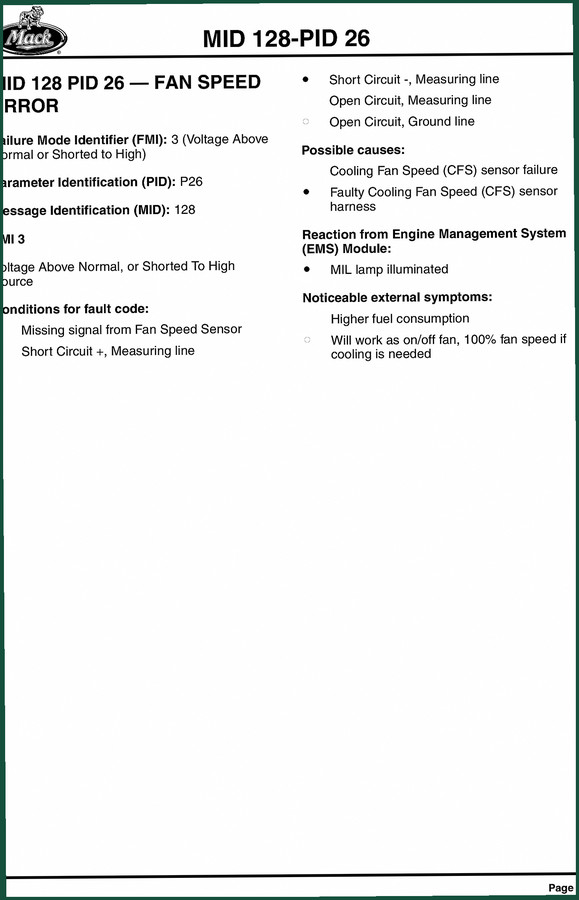
You’ve got a Mack MID 128 Diagnostics Manual in your hands? Good. That means you’re serious about fixing the electrical gremlins that make a perfectly good truck idle in the bay. I’ve seen guys chase a fan speed sensor fault for two billable hours because they guessed at the wiring instead of pulling the factory logic. This document kills that guesswork. It’s the actual OEM diagnostics used by Mack dealerships – 103 pages of failure mode identifiers, parameter IDs, and EMS reactions. Not a blurred photocopy of a third-party rewrite. You want to know why the cooling fan runs at 100% when it shouldn’t? That answer starts on page 19.
PID 26 FMI 3: Fan Speed Error Diagnostic Procedure
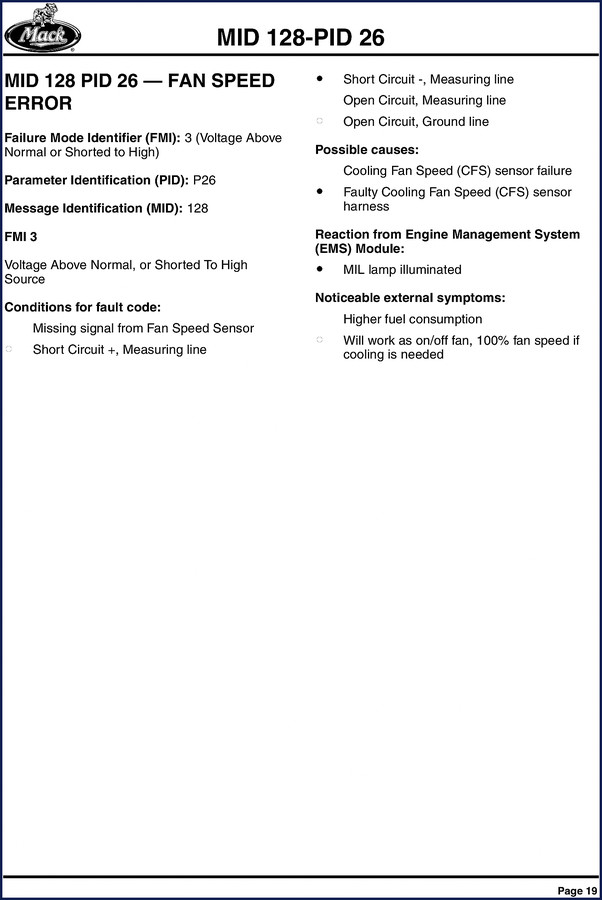
Page 19 hand you the exact conditions that trigger a P26 FMI 3 – voltage above normal or shorted to high source. The manual lists every possible cause: missing signal from the cooling fan speed sensor, short to power on the measuring line, short to ground, open circuit on the measuring line, and an open ground line. Most aftermarket guides stop at “check the sensor.” This one gives you the specific symptom: the EMS module lights the MIL lamp, you’ll see higher fuel consumption, and the fan will work as an on/off fan – 100% speed if cooling is needed. You don’t need to invent a test; the book tells you what to meter and where.
103 Pages of Factory Fault Code Logic
Every page is dedicated to one thing – fault codes. No fluff chapters on “how an engine works.” The manual is organized by MID (Message Identification), then PID, then FMI. It covers MID 128 and related codes for the engine control system. You get the conditions for the fault, the reaction from the Engine Management System (EMS) module, and the noticeable external symptoms. For the fan speed error, you also get the mechanical reaction: “Will work as on/off fan, 100% fan speed if cooling is needed.” That level of detail saves you from swapping parts that aren’t bad.
What the EMS Module Tells You
The manual doesn’t leave you with a code and then sign off. It explains the EMS reaction for each fault. For P26 FMI 3, the MIL lamp illuminates. For other codes, you’ll see different responses – fuel injection cut, speed limitation, or derate. Knowing what the ECM plans to do helps you prioritize the repair. If the MIL is on but the truck still pulls, you can drive it to the shop. If the ECM is going to cut power, you need to fix it before the customer leaves the yard. That’s why OEM documentation matters: the factory tells you the severity.
Five Common Wiring Failures in the Fan Harness
The manual lists five possible causes for the fan speed error in order of likelihood: cooling fan speed sensor failure, faulty sensor harness, short circuit on the + measuring line, short circuit on the – measuring line, and open circuit on the ground line. Each cause is a separate test step. Don’t start by replacing the sensor; first, check the harness for a chafed wire that shorts to the chassis. The manual gives you the logical sequence. Skip steps and you’ll be back next week with a new sensor that still sets the same code.
Check the Sensor Circuit Before Replacing Parts
Safety first: disconnect the batteries before you probe any harness connector. You’re dealing with 24V systems on Mack trucks. The manual assumes you have a digital multimeter with a peak-hold function for intermittent faults. It doesn’t tell you “use a test light.” It expects you to test resistance and voltage drop across the sensor terminals. Refer to the engine-side connector pinout (not included in this doc – you’ll need the service manual for that). But the diagnostic logic is here, so you know exactly which wire to check. For the fan speed sensor, the manual points you to the “Measuring line” – that’s the signal wire – and the ground line. If you find 0V when the fan is spinning, you’ve got an open circuit.
Why the Mack MID 128 Diagnostics Manual Beats Aftermarket Copies
I’ve seen $19.99 PDFs that claim to cover “all engine codes.” They combine Mack, Cummins, and Detroit into one mess of generic FMI descriptions. This manual is specific to Mack MID 128. It’s the original factory file – 103 pages, scanned from the OEM binder, not re-typed by a guy who once owned a diesel shop. The language is terse, the formatting is dense, and every page has the Mack logo. That’s the only way to guarantee the torque specs and fault conditions are right. Aftermarket documents have gotten me burned before – wrong pin numbers, missing FMIs. Stick with the original.
Required Tools and Safety Warnings
Before you start, gather: a DVOM with min/max recording, a fused jumper wire set, and the vehicle’s wiring diagram (not in this manual – get the Mack service manual for that). Ground yourself to the frame before touching any ECM connector. Never back-probe a sealed connector – use breakout leads. The manual’s diagnostic flow expects you to verify power at the sensor (5V reference if it’s a three-wire hall effect) and proper ground. If the sensor is mechanically driven off the fan hub, check the magnetic pickup for metal shavings. The manual doesn’t say that, but 20 years of experience does.
Related Manuals for the Full Picture
This diagnostics manual pairs well with other OEM documents for your Mack. For complete engine service and repair, get the Mack CHU CXU GU TD 2010 Diagnostics Manual for chassis-level electrical. For operator procedures and dash switch descriptions, the Mack TerraPro MRU Series 2010 Operator’s Handbook covers daily use. And for engine mechanical specs, the Mack MP7 MP8 MP10 Engines 2010 Operators Manual gives you oil capacities and valve adjustment procedures. All factory documents, same source.
External Resources
To understand the broader on-board diagnostics standard that Mack uses, Wikipedia’s article on On-board Diagnostics (OBD) explains the SAE J1939 protocol that underlies these MID/PID/FMI codes. And for anyone working on a manual transmission truck, the Manual Transmission article provides background on how the fan is often belt-driven off the engine – relevant because a slipping belt can mimic a sensor failure.
- Does this manual include wiring diagrams?
- No. This manual focuses on diagnostic trouble codes, not full wiring schematics. You need a separate service manual for harness diagrams.
- Can I use this to fix a fan that runs constantly?
- Yes. Page 19 covers PID 26 FMI 3 – voltage above normal or shorted to high. That condition can cause the fan to run at 100% when cooling is needed. The manual walks you through testing the cooling fan speed sensor circuit, checking for short to power, ground, or open circuits. It also tells you the EMS reaction: the MIL lamp will be on. If the sensor signal is missing but there’s no short, the ECM defaults to on/off control at full speed. The manual’s logic flow will have you verify the sensor signal at the ECM pin, then trace back to the sensor. That’s the kind of depth you need for intermittent faults that only appear under load.
If you’re tired of chasing electrical ghosts on a Mack MID 128, this is the factory document that tells you exactly what the ECM is looking for. Access the Factory Manual.
Additional information
| Brand | Mack |
|---|---|
| Language | English |
2 reviews for Mack MID 128 Diagnostics Manual – 103-Page OEM Fault Code Guide
Only logged in customers who have purchased this product may leave a review.
You may also like…
-
Sale!
Mack E9 1993 Service Manual – OEM Factory Engine Overhaul
Original price was: $57.60.$45.00Current price is: $45.00. -
Sale!

Mack ASET AI, ASET AMI 2006 Service Manual – OEM EGR Diesel Specs
Original price was: $64.35.$45.00Current price is: $45.00. -
Sale!
Mack GU, CHU, CXU, TD 2010 Troubleshooting Manual – OEM Wiring & Diagnostics
Original price was: $70.65.$45.00Current price is: $45.00. -
Sale!
Mack T313, T318 2008 Service Manual – Factory Transmission Procedures
Original price was: $67.50.$45.00Current price is: $45.00.
Related products
-
Sale!

2005 Parts Catalog – International NGD 3.0 L Engine (77 pages)
Original price was: $44.70.$30.00Current price is: $30.00. -
Sale!

2011 Parts Catalog – International 7400 SFA 6X6 – 1886 Pages of OEM Part Numbers
Original price was: $32.00.$25.00Current price is: $25.00. -
Sale!

1992 Electrical Schematic – OEM Wiring Diagrams for International 1000-3800
Original price was: $24.48.$18.00Current price is: $18.00. -
Sale!
1993 Electrical Schematic – International 1000/3000/4000 Bus Chassis OEM Wiring Diagrams
Original price was: $29.26.$22.00Current price is: $22.00.
John S. –
Superb resource! The PDF is high resolution. A must-have for any Mack MID mechanic doing maintenance. Saved my weekend project! Thanks.
James L. –
This is exactly what I required. Quick access after payment. It guided me to rebuild my Mack MID transmission. I will recommend this shop to others.