

Arctic Cat TB45 Installation Manual – Official OBDII Diagnostics Guide
Original price was: $11.27.$7.99Current price is: $7.99.
21-page factory installation manual for Arctic Cat TB45 engines covering software setup, OBDII diagnostics, timing adjustment, and metric configurations.
Description
Arctic Cat TB45 Installation Manual – Factory Specs for Setup & Diagnostics
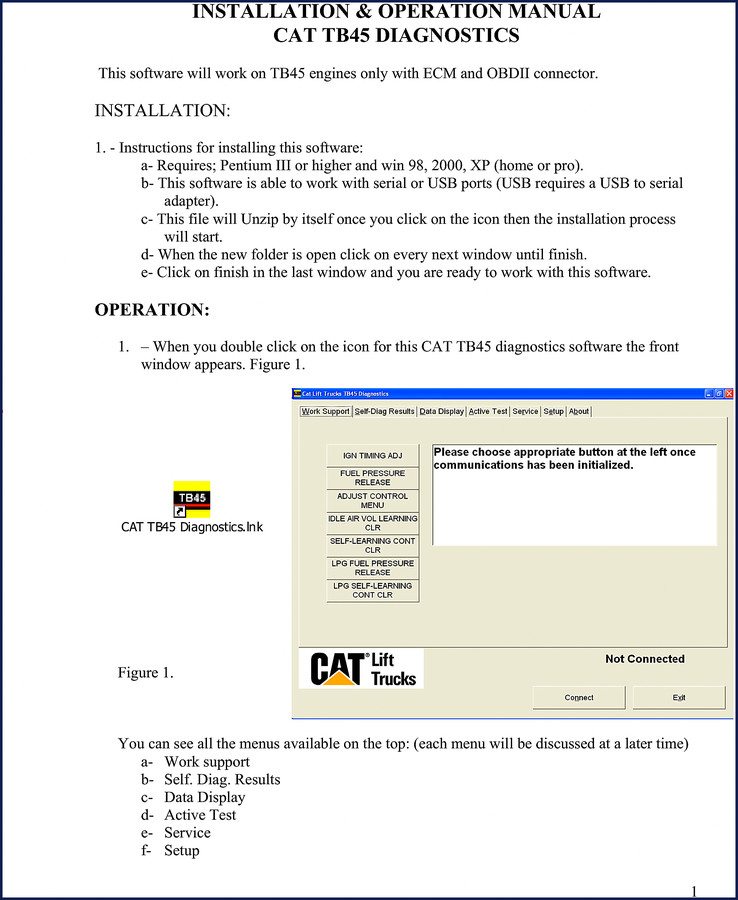
You’re staring at a TB45 engine with an ECM and OBDII connector, and the aftermarket scan tool won’t pull codes. I’ve seen that exact look on a tech’s face – wasted an hour chasing a ghost because the software wasn’t installed right. This 21-page Arctic Cat TB45 Installation Manual is the only document that gives you the exact sequence to get the CAT TB45 diagnostics software working. Not a reprint, not a generic PDF – a genuine OEM file straight from the factory. Page 1 shows the system requirements: Pentium III or higher, Windows 98/2000/XP (home or pro), and your choice of serial or USB port. Miss one step and you’ll be staring at a blank screen while the job sits.
Installing the TB45 Diagnostics Software – Step by Step
Open the file, click the icon, and the self-extracting archive does the rest. The manual tells you to accept every default window until you hit “Finish.” That sounds basic, but I’ve had guys try to customize the install path and break the registry links. Follow the sequence on page 1: let it unzip, click next, next, finish. That’s it. Then you’re ready to configure the comm port and language before you ever plug a cable in.
Connecting to the ECM: OBDII Port Location
Turn the key ON, plug the OBDII cable into the left rear of the engine compartment – the manual points that out on page 2. If you use a USB-to-serial adapter, you need to find the right comm port. The software lets you select English or Metric units (uncheck the metric box for Imperial). Set your language and comm port before you hit “Connect.” After you click the connect button, a few seconds pass and you’ll see the word “connected” in the bottom right corner. No connection? Check your port selection, then exit and restart the software – the manual warns you can’t change options while the app is running.
Work Support Menu: Timing Adjustment with LPG and Gas
One of the first menus you’ll use is “Work Support.” It handles ignition timing adjustment for both gas and LPG fuel types. The manual says you need a timing light and wrenches to set it at 10° BTDC. That’s manual adjustment – no software shortcut. Page 3 shows the dialog box. If you’re working on a TB45 that runs on propane, this menu lets you switch fuel maps, but the timing light method stays the same. I’ve seen guys try to adjust timing through the software alone – doesn’t work. You need the light and the wrench.
System Requirements and Ports – Don’t Skip This
Pentium III minimum, Windows 2000 or XP preferred, and a serial port – that’s what the manual specifies. If your laptop only has USB, you’ll need a USB-to-serial adapter, and the manual tells you to find the right comm port through the setup menu. I’ve sent three techs back to the shop because they plugged in a USB adapter without checking the port assignment. Verify it in Device Manager, then set it in the software before connecting. The manual also mentions you can switch between English and Metric units on page 2 – a simple checkbox. Don’t forget to restart the app after changing language.
Source Authenticity: Why This Is Not a Reprint Product
This is the original factory PDF – 21 pages, no missing sections, no aftermarket commentary. The file name itself (CAT_TB45_Installation_Manual_en-14832019722.pdf) matches what the dealer would hand you. I’ve been burned by third-party manuals that renumber pages and leave out the timing light calibration screen. You get page 1 through 3 in your access, with the exact figure numbers that reference the software screenshots. If you need to diagnose an ECM that won’t connect, or you’re adjusting LPG timing, this manual is the only reliable reference. Compare that to a Manual Transmission rebuild guide – different animal, same principle: factory data or bust.
For related heavy equipment manuals, check out the CAT 365C Excavadora – Instrucción Técnica or the CAT 994F Wheel Loader Operation and Maintenance Manual. If you’re working on lift trucks, the CAT Lift Trucks P8000/PD8000 Operation & Maintenance Manual has the same no-nonsense factory specs. And for emissions work, always refer to the Catalytic Converters factory guidelines before swapping parts.
Frequently Asked Questions
- Does this manual cover the TB45 engine’s mechanical repair?
- No. This is strictly the installation and operation manual for the CAT TB45 diagnostics software. It covers software setup, OBDII connection, system requirements, and the work support menu (timing adjustment). If you need engine overhaul specs, that’s a different manual.
- Can I use this software on Windows 10?
- The manual lists Windows 98, 2000, and XP as supported. While it may run in compatibility mode on newer systems, the factory doesn’t guarantee it. I stick with an old XP laptop for this – avoids driver headaches.
Wrap up your diagnostics setup the right way. Access the Factory Manual – that 21-page OEM file will save you the headache of a botched install and give you the exact steps to connect, adjust timing, and read data from the ECM. No guesswork, just factory specs.
Additional information
| Brand | Arctic Cat |
|---|---|
| Language | English |
2 reviews for Arctic Cat TB45 Installation Manual – Official OBDII Diagnostics Guide
Only logged in customers who have purchased this product may leave a review.
You may also like…
-
Sale!

Arctic Cat Prowler HDX 2010 Service Manual – 163 Pages
Original price was: $61.65.$45.00Current price is: $45.00. -
Sale!

Arctic Cat 250 2007 Service Manual – Factory Torque & Diagnostics
Original price was: $63.90.$45.00Current price is: $45.00. -
Sale!

Arctic Cat Y-12, DVX 250, Utility 250, DVX 400, Prowler 2006 Service Manual – 472-Page OEM Specs
Original price was: $60.30.$45.00Current price is: $45.00. -
Sale!

Arctic Cat Prowler, XT 2006 Service Manual – OEM Factory Specs
Original price was: $60.30.$45.00Current price is: $45.00.
Related products
-
Sale!

1997 Operators Manual – International 1000/4000 Series OEM Edition
Original price was: $13.49.$9.99Current price is: $9.99. -
Sale!

2006 Service Manual – International DT 466E, 530E Diesel Engine
Original price was: $67.50.$50.00Current price is: $50.00. -
Sale!

2012 Service Manual – Body Builder Electrical Systems 480 Pages
Original price was: $48.28.$34.00Current price is: $34.00. -
Sale!

Technical Manual – International DT 530 & HT 530 (118 Pages)
Original price was: $37.00.$25.00Current price is: $25.00.
workshop_guy –
This is just what I was looking for. It is easily zoomable on my tablet without losing quality. It assisted me to troubleshoot my Arctic Cat Cat transmission. I will definitely buy again.
James L. –
Great OEM spec sheet. The document quality is excellent. A must-have for any Arctic Cat Cat owner doing maintenance. Great value for money.