
Detroit Diesel DDEC 6.3 User Manual – OEM Diagnostic Software Guide
Original price was: $12.54.$7.99Current price is: $7.99.
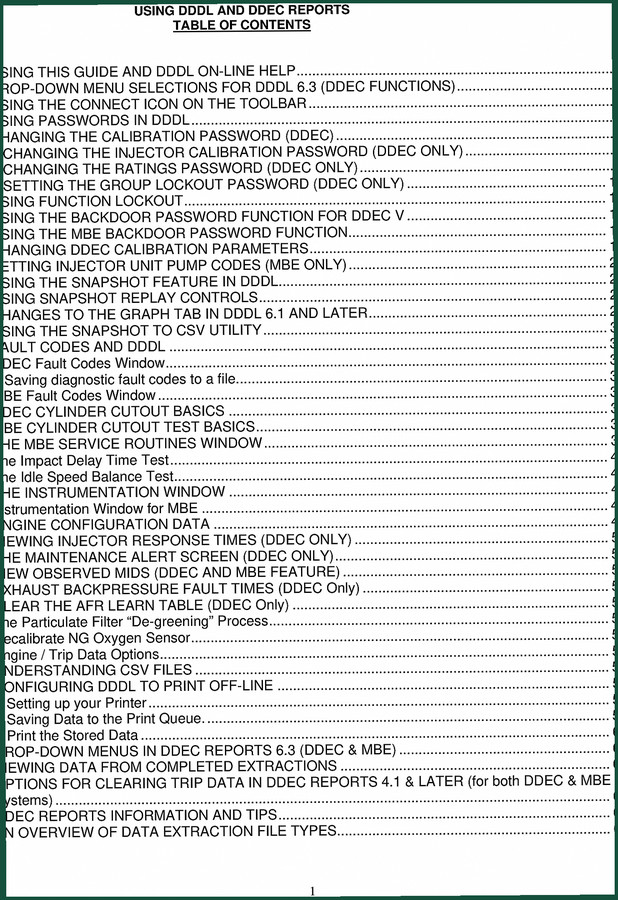
Factory DDEC 6.3 user manual covering DDDL software: passwords, fault codes, calibration, snapshot, cylinder cutout. 68 pages, OEM spec.
Description
Detroit Diesel DDEC 6.3 User Manual
I’ve had more than one apprentice try to wing it with a cracked aftermarket PDF and end up locking an ECM solid. That mistake costs you a new control module and a lot of downtime. If you’re touching a Series 60 or any Detroit with DDEC electronics, you need the official instructions. This is the Detroit Diesel DDEC 6.3 User Manual — 68 pages of factory procedure for the DDDL software. Not a reprint, not a third-party guess. This is the document Detroit Diesel shipped to dealers. Period.
What This Manual Actually Covers
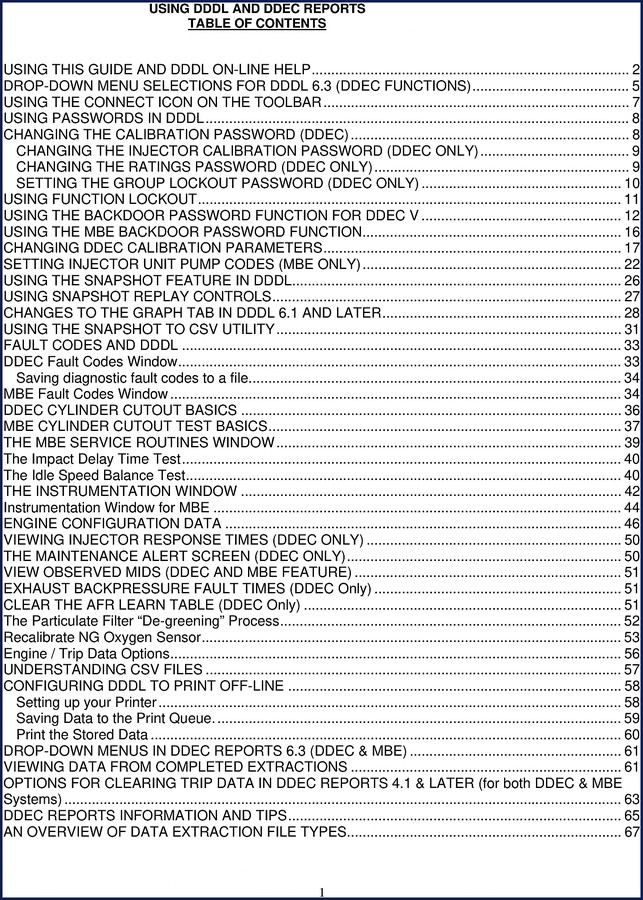
Drop-down menu selections for DDDL 6.3, connecting via the toolbar icon, handling passwords (calibration, injector calibration, ratings, group lockout), using the backdoor password function for DDEC V and MBE, changing calibration parameters, setting injector unit pump codes (MBE), snapshot feature and replay controls, graph tab changes from 6.1 onward, saving snapshot data to CSV, fault code windows for both DDEC and MBE, cylinder cutout basics for both engine families, MBE service routines (impact delay time test, idle speed balance test), the instrumentation window, engine configuration data, injector response times (DDEC only), and the maintenance alert screen. That’s the skeleton. Every section is laid out in the order you’d use them on a real truck.
Passwords in DDDL: Lockouts and Backdoors
Page 8 gets into the calibration password. If you don’t know how to change it or you accidentally trigger a lockout, you’re stuck. This manual walks you through changing the calibration password (DDEC), changing the injector calibration password (DDEC only), and setting the group lockout password (DDEC only). Then it covers the backdoor password for DDEC V and for MBE. I’ve seen techs skip the backdoor section and then call me asking why they can’t reflash. Read page 12 if you’re on a DDEC V. It’s not optional.
Snapshot Feature and Data Logging (Page 26)
Intermittent faults are the worst. You can drive all day, nothing happens, then boom – limp mode 300 miles from the shop. The snapshot feature on page 26 lets you capture engine data when the fault occurs. You set the trigger, and DDDL records pre- and post-fault data. This manual explains how to use the snapshot replay controls and how to export the data to CSV for analysis. Page 27 shows the replay buttons. Don’t try to figure it out by clicking random icons; that’s a good way to overwrite your only capture.
Fault Codes: Reading, Saving, and Clearing
Starting on page 33, the manual covers both DDEC and MBE fault code windows. You get the procedure for reading active and inactive codes, saving diagnostic fault codes to a file, and interpreting the MBE fault code window (page 34). If you’ve ever had a customer argue that a code wasn’t there before, the save-to-file function is your insurance. This section also touches on the AFR lean/rich fault times (page 51) for DDEC only. No guessing which codes are emissions-related; the manual spells it out.
Cylinder Cutout and Service Routines
Two separate sections cover cylinder cutout basics for DDEC (page 36) and MBE (page 37). These are not just theory. You can run a cutout test to find a weak cylinder without pulling injectors. For MBE, there’s the impact delay time test and idle speed balance test (page 39-40). The manual gives you the expected results and what to do when a cylinder fails the test. A mechanic who skips this section is throwing hours away chasing fuel pressure when it’s a single injector.
Why OEM Documentation Matters
I’ve seen aftermarket copies that miss the group lockout password step or label the snapshot CSV export incorrectly. That’s not a typo; that’s lost data. This manual came straight from Detroit Diesel. Every page matches the factory software build. If you need the exact wording for a password prompt or the correct sequence to change a calibration, it’s here. No reprints, no third-party edits. That matters when you’re in a bay with a 60-series engine and the clock is ticking.
Before you grab any manual, understand the difference. The DDDL and DDEC Reports User Guide”>DDDL and DDEC Reports User Guide covers report generation; this manual is the operational core. If you work on Series 60 engines, pair it with Información Adicional Datos de Taller Serie 60″>Información Adicional Datos de Taller Serie 60 for mechanical specs. For newer platforms, grab the Detroit Diesel DD13 2010 EPA Update Training Manual”>Detroit Diesel DD13 2010 EPA Update Training Manual. And if you need to understand how the engine’s mechanical ancillaries interact, check out the Manual Transmission”>Manual Transmission and Diesel Particulate Filters”>Diesel Particulate Filters overviews on Wikipedia.
- Does this manual include engine overhaul torque specs?
- No. It covers DDDL software operation only. For mechanical torque values, use the factory shop manual.
- Can I use this manual with a DDEC IV or older system?
- This manual is written for DDDL 6.3 software and DDEC V/MBE engines. Older DDEC versions have different menu structures. The password and snapshot concepts are similar, but the exact screens differ. If you’re working on a DDEC III, find the correct DDDL version manual for that ECM. The base functions (calibration password, fault codes) share a lineage, but you risk selecting the wrong parameter if you rely solely on this. I would not attempt a DDEC IV calibration change using this manual without verifying the menu path on the older software. Detroit Diesel made specific changes to the navigation starting with DDDL 6.1 that affect later versions.
- What diagnostic tools do I need to run the software?
- You need a laptop with DDDL 6.3 installed and a compatible Deutsch 9-pin or 6-pin adapter. The manual assumes you have the Pro-Link or equivalent interface. It does not cover hardware setup; that’s in the DDDL installation guide.
- Is this a reprint or a scanned copy?
- It is a clean digital reproduction of the original Detroit Diesel document. 68 pages, searchable, with bookmarks. No missing sections.
If you’re ready to stop guessing and start following the exact steps the factory intended, Access the Factory Manual from our store. It will sit on your shop laptop next to the wiring diagrams and save you at least one ECM replacement cost.
Additional information
| Brand | Detroit Diesel |
|---|---|
| Language | English |
3 reviews for Detroit Diesel DDEC 6.3 User Manual – OEM Diagnostic Software Guide
Only logged in customers who have purchased this product may leave a review.
You may also like…
-
Sale!
Detroit Diesel Series 50 2004 Service Manual – 1683 Pages of OEM Specs
Original price was: $78.00.$65.00Current price is: $65.00. -
Sale!
Detroit Diesel 53 1973 Service Manual – Factory Specs for Two-Stroke
Original price was: $80.60.$65.00Current price is: $65.00. -
Sale!
Detroit Diesel MBE 4000 2004 Service Manual – OEM Specs & Procedures
Original price was: $91.00.$65.00Current price is: $65.00. -
Sale!
Detroit Diesel Series 60, Series 60G, 6067-GK60, 6067-GU60, 6067-WU60 Service Manual
Original price was: $77.40.$60.00Current price is: $60.00.
Related products
-
Sale!

Technical Manual – International DT 530 & HT 530 (118 Pages)
Original price was: $37.00.$25.00Current price is: $25.00. -
Sale!

1992 Electrical Schematic – OEM Wiring Diagrams for International 1000-3800
Original price was: $24.48.$18.00Current price is: $18.00. -
Sale!
1993 Operators Manual – International Bus 1000-3000 OEM Specs
Original price was: $12.30.$7.99Current price is: $7.99. -
Sale!

2011 Parts Catalog – International 7400 SFA 6X6 – 1886 Pages of OEM Part Numbers
Original price was: $32.00.$25.00Current price is: $25.00.
James L. –
Outstanding! The scan is high-quality and easy to navigate. Every wiring layout is included for Detroit Diesel Diesel. Highly recommended for mechanics.
Charles W. –
Superb resource! Instant access after checkout process. Contains precise schematics for Detroit Diesel. Saves me so much time.
David K. –
Excellent factory service manual. Immediate link after checkout. A must-have for any Detroit Diesel Diesel DIYer doing repairs. Great value for money.